- Basic Image Operations
- Python Pillow - Working with Images
- Python Pillow - Resizing an Image
- Python Pillow - Flip and Rotate Images
- Python Pillow - Cropping an Image
- Python Pillow - Adding Borders to Images
- Python Pillow - Identifying Image Files
- Python Pillow - Merging Images
- Python Pillow - Cutting and Pasting Images
- Python Pillow - Rolling an Image
- Python Pillow - Writing text on image
- Python Pillow - ImageDraw Module
- Python Pillow - Concatenating two Images
- Python Pillow - Creating Thumbnails
- Python Pillow - Creating a Watermark
- Python Pillow - Image Sequences
- Python Pillow Color Conversions
- Python Pillow - Colors on an Image
- Python Pillow - Creating Images With Colors
- Python Pillow - Converting Color String to RGB Color Values
- Python Pillow - Converting Color String to Grayscale Values
- Python Pillow - Change the Color by Changing the Pixel Values
- Image Manipulation
- Python Pillow - Reducing Noise
- Python Pillow - Changing Image Modes
- Python Pillow - Compositing Images
- Python Pillow - Working with Alpha Channels
- Python Pillow - Applying Perspective Transforms
- Image Filtering
- Python Pillow - Adding Filters to an Image
- Python Pillow - Convolution Filters
- Python Pillow - Blur an Image
- Python Pillow - Edge Detection
- Python Pillow - Embossing Images
- Python Pillow - Enhancing Edges
- Python Pillow - Unsharp Mask Filter
- Image Enhancement and Correction
- Python Pillow - Enhancing Contrast
- Python Pillow - Enhancing Sharpness
- Python Pillow - Enhancing Color
- Python Pillow - Correcting Color Balance
- Python Pillow - Removing Noise
- Advanced Topics
- Python Pillow - Creating Animated GIFs
- Python Pillow - Batch Processing Images
- Python Pillow - Converting Image File Formats
- Python Pillow - Adding Padding to an Image
- Python Pillow - Color Inversion
- Python Pillow - M L with Numpy
- Python Pillow with Tkinter BitmapImage and PhotoImage objects
- Image Module
- Python Pillow - Image Blending
- Python Pillow Useful Resources
- Python Pillow - Quick Guide
- Python Pillow - Function Reference
- Python Pillow - Useful Resources
- Python Pillow - Discussion
Python Pillow - Enhancing Sharpness
Sharpness is a key factor in defining the clarity and detail in a photograph, and it serves as a valuable tool for emphasizing texture and visual impact.
Enhancing Sharpness is an image processing technique used to enhance an image's edges, details, and contrast, resulting in a clearer and more vivid appearance. This process can significantly enhance the quality and visibility of images that are blurry, noisy, or distorted because of factors such as camera shake, low resolution, or compression.
Enhancing Sharpness of an Image
In Python Pillow library, enhancing and adjusting the sharpness of an image can be achived by using the ImageEnhance.Sharpness() class. It allows you to adjust the sharpness of an image by applying the enhancement factor.
Below is the syntax of the ImageEnhance.Sharpness() class −
class PIL.ImageEnhance.Sharpness(image)
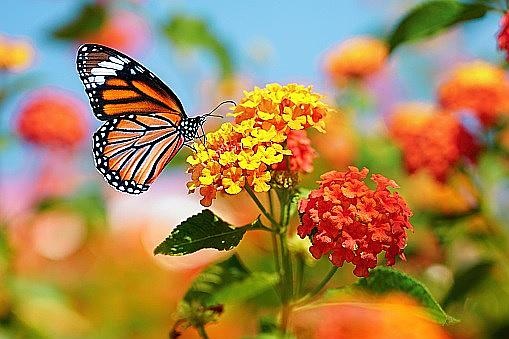
An enhancement factor represented as a floating-point value, is passed as an argument to the common single interface method, enhance(factor). This factor plays an important in adjusting the image's sharpness. Using a factor of 0.0 can lead to a completely blurred image, while a factor of 1.0 gives the original image. And higher values enhance the image's sharpness.
Following are the steps to achieve Sharpness Enhancement of an image −
Create a Sharpness enhancer object using the ImageEnhance.Sharpness() class.
Then apply the enhancement factor to the enhancer object using the enhance() method.
Example - Enhancing Sharpness of an Image
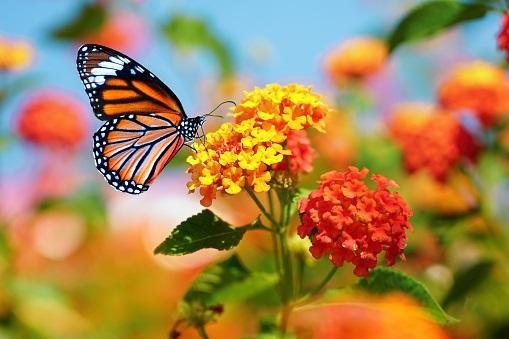
Here's an example that demonstrates how to adjust the sharpness of an image by specifying a factor.
main.py
from PIL import Image, ImageEnhance

# Open an image file
image = Image.open('Images/butterfly_and_flowers.jpg')

# Create a Sharpness object
Enhancer = ImageEnhance.Sharpness(image)

# Display the original image
image.show()

# Enhance the sharpness with a factor of 4.0
sharpened_image = enhancer.enhance(4.0)

# Display the sharpened image
sharpened_image.show()
Output
The Input image −
The output sharpness enhanced image −
Example - Blurring an Image
In this example, you can obtain a blurred version of the input image by setting the enhancement factor to a value close to zero.
main.py
from PIL import Image, ImageEnhance

# Open an image file
image = Image.open('Images/butterfly.jpg')

# Create a Sharpness object
enhancer = ImageEnhance.Sharpness(image)

# Display the original image
image.show()

# Decrease the sharpness by using a factor of 0.05
sharpened_image = enhancer.enhance(0.05)

# Display the sharpened image
sharpened_image.show()
Output
The input image −
The output blurred version of the input image −