- Basic Image Operations
- Python Pillow - Working with Images
- Python Pillow - Resizing an Image
- Python Pillow - Flip and Rotate Images
- Python Pillow - Cropping an Image
- Python Pillow - Adding Borders to Images
- Python Pillow - Identifying Image Files
- Python Pillow - Merging Images
- Python Pillow - Cutting and Pasting Images
- Python Pillow - Rolling an Image
- Python Pillow - Writing text on image
- Python Pillow - ImageDraw Module
- Python Pillow - Concatenating two Images
- Python Pillow - Creating Thumbnails
- Python Pillow - Creating a Watermark
- Python Pillow - Image Sequences
- Python Pillow Color Conversions
- Python Pillow - Colors on an Image
- Python Pillow - Creating Images With Colors
- Python Pillow - Converting Color String to RGB Color Values
- Python Pillow - Converting Color String to Grayscale Values
- Python Pillow - Change the Color by Changing the Pixel Values
- Image Manipulation
- Python Pillow - Reducing Noise
- Python Pillow - Changing Image Modes
- Python Pillow - Compositing Images
- Python Pillow - Working with Alpha Channels
- Python Pillow - Applying Perspective Transforms
- Image Filtering
- Python Pillow - Adding Filters to an Image
- Python Pillow - Convolution Filters
- Python Pillow - Blur an Image
- Python Pillow - Edge Detection
- Python Pillow - Embossing Images
- Python Pillow - Enhancing Edges
- Python Pillow - Unsharp Mask Filter
- Image Enhancement and Correction
- Python Pillow - Enhancing Contrast
- Python Pillow - Enhancing Sharpness
- Python Pillow - Enhancing Color
- Python Pillow - Correcting Color Balance
- Python Pillow - Removing Noise
- Advanced Topics
- Python Pillow - Creating Animated GIFs
- Python Pillow - Batch Processing Images
- Python Pillow - Converting Image File Formats
- Python Pillow - Adding Padding to an Image
- Python Pillow - Color Inversion
- Python Pillow - M L with Numpy
- Python Pillow with Tkinter BitmapImage and PhotoImage objects
- Image Module
- Python Pillow - Image Blending
- Python Pillow Useful Resources
- Python Pillow - Quick Guide
- Python Pillow - Function Reference
- Python Pillow - Useful Resources
- Python Pillow - Discussion
Python Pillow - Merging Images
Pillow (PIL) library is used for merging or combining individual bands of an image to create a new multiband image. It's particularly useful when working with multispectral or multichannel images such as RGB or CMYK images and we want to create a new image by merging specific bands.
In pillow we have the merge() method which belongs to the Image module which is used to merge the given input images.
This method is useful for tasks like combining multiple channels of satellite or medical images, creating custom color images or working with images that have separate channels that need to be combined into a single image.
Syntax
Here's the syntax and usage of the Image.merge() method −
Image.merge(mode, bands)
Where,
mode − This parameter specifies the mode of the new multiband image. It should match the mode of the individual bands we want to merge. Common modes include "RGB" for color images, "RGBA" for images with an alpha channel, and "CMYK" for cyan, magenta, yellow and black color spaces.
bands − This parameter is a tuple of individual image bands that we want to merge. Each band should be a single-channel image or a grayscale image.
Example - Merging Image with RGB Bands
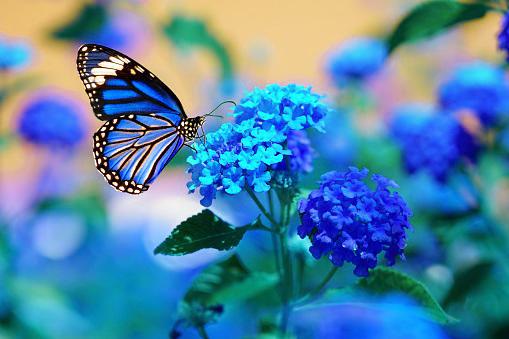
Here is an example of how to use the Image.merge() method to merge the red, green and blue bands of an image to create a new RGB image.
main.py
from PIL import Image

image = Image.open("Images/butterfly.jpg")
r, g, b = image.split()
image = Image.merge("RGB", (b, g, r))
image.show()
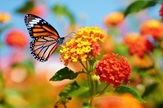
Image to be used
Output
Example - Merging Images
Here, in this example we are merging two input images by using the merge() method of the Image module of pillow library.
from PIL import Image
image1 = Image.open("Images/butterfly.jpg")
image2 = Image.open("Images/handwriting.jpg")

#resize, first image
image1 = image1.resize((426, 240))
image1_size = image1.size
image2_size = image2.size
new_image = Image.new("RGB",(2*image1_size[0], image1_size[1]), (250,250,250))
new_image.paste(image1,(0,0))
new_image.paste(image2,(image1_size[0],1))
new_image.save("Output_Images/merged.jpg")
new_image.show()
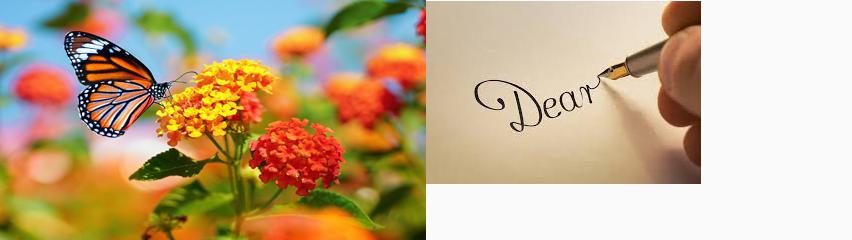
The two images to be merged

Output