- Basic Image Operations
- Python Pillow - Working with Images
- Python Pillow - Resizing an Image
- Python Pillow - Flip and Rotate Images
- Python Pillow - Cropping an Image
- Python Pillow - Adding Borders to Images
- Python Pillow - Identifying Image Files
- Python Pillow - Merging Images
- Python Pillow - Cutting and Pasting Images
- Python Pillow - Rolling an Image
- Python Pillow - Writing text on image
- Python Pillow - ImageDraw Module
- Python Pillow - Concatenating two Images
- Python Pillow - Creating Thumbnails
- Python Pillow - Creating a Watermark
- Python Pillow - Image Sequences
- Python Pillow Color Conversions
- Python Pillow - Colors on an Image
- Python Pillow - Creating Images With Colors
- Python Pillow - Converting Color String to RGB Color Values
- Python Pillow - Converting Color String to Grayscale Values
- Python Pillow - Change the Color by Changing the Pixel Values
- Image Manipulation
- Python Pillow - Reducing Noise
- Python Pillow - Changing Image Modes
- Python Pillow - Compositing Images
- Python Pillow - Working with Alpha Channels
- Python Pillow - Applying Perspective Transforms
- Image Filtering
- Python Pillow - Adding Filters to an Image
- Python Pillow - Convolution Filters
- Python Pillow - Blur an Image
- Python Pillow - Edge Detection
- Python Pillow - Embossing Images
- Python Pillow - Enhancing Edges
- Python Pillow - Unsharp Mask Filter
- Image Enhancement and Correction
- Python Pillow - Enhancing Contrast
- Python Pillow - Enhancing Sharpness
- Python Pillow - Enhancing Color
- Python Pillow - Correcting Color Balance
- Python Pillow - Removing Noise
- Advanced Topics
- Python Pillow - Creating Animated GIFs
- Python Pillow - Batch Processing Images
- Python Pillow - Converting Image File Formats
- Python Pillow - Adding Padding to an Image
- Python Pillow - Color Inversion
- Python Pillow - M L with Numpy
- Python Pillow with Tkinter BitmapImage and PhotoImage objects
- Image Module
- Python Pillow - Image Blending
- Python Pillow Useful Resources
- Python Pillow - Quick Guide
- Python Pillow - Function Reference
- Python Pillow - Useful Resources
- Python Pillow - Discussion
Python Pillow - Blurring an Image
Blurring an Image is a fundamental concept in image processing, used to reduce the level of detail or sharpness in an image. The primary purpose of blurring is to make an image appear smoother or less sharp. Blurring can be achieved through various mathematical operations, convolution kernels, or filters.
Python's Pillow library offers several standard image filters within the ImageFilter module to perform the different blurring operations on the image by calling the image.filter() method. In this tutorial we will see different image blurring filters provided by the ImageFilter module.
Applying Blur Filter to an Image
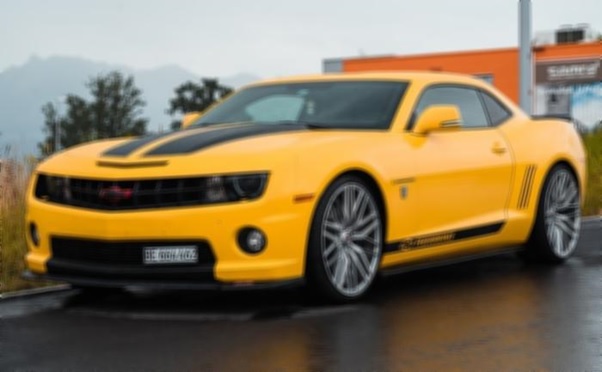
Blurring an image can be done by using the ImageFilter.BLUR filter, which is one of the built-in filter options available in the current version of the Pillow library and is used to create a blurred effect in the image.
Following are the steps for applying image blurring −
Load the input image using the Image.open() function.
Apply the filter() function to the loaded Image object and provide ImageFilter.BLUR as an argument to the function. The function will return the blurred image as a PIL.Image.Image object.
Following is the input image used in all the examples of this chapter.
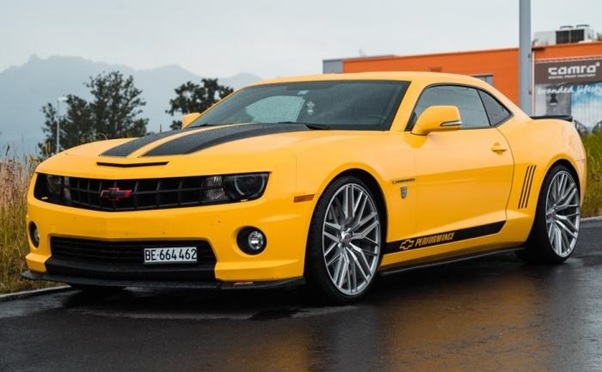
Example - Blurring an Image
Here is the example using the Image.filter() method with ImageFilter.BLUR kernel filter.
from PIL import Image, ImageFilter

# Open an existing image
original_image = Image.open('Images/yellow_car.jpg')

# Apply a blur filter to the image
blurred_image = original_image.filter(ImageFilter.BLUR)

# Display the original image
original_image.show()

# Display the blurred mage
blurred_image.show()
Output Image
Applying the BoxBlur Filter
The BoxBlur filter is used to blur an image by setting each pixel's value to the average value of the pixels within a square box that extends a specified number of pixels in each direction. For this yo can use the BoxBlur() class from the Pillow's ImageFilter module.
Following is the syntax of the ImageFilter.BoxBlur() class −
class PIL.ImageFilter.BoxBlur(radius)
The PIL.ImageFilter.BoxBlur() class accepts a single parameter −
radius − This parameter specifies the size of the square box used for blurring in each direction. It can be provided as either a sequence of two numbers (for the x and y directions) or a single number that applies to both directions.
If radius is set to 1, it takes the average of the pixel values within a 3x3 square box (1 pixel in each direction, resulting in 9 pixels in total). A radius value of 0 doesn't blur the image and returns an identical image.
Example - Box Blur an Image
Here's an example that demonstrates how to use the BoxBlur() filter for image blurring.
main.py
from PIL import Image, ImageFilter

# Open an existing image
original_image = Image.open('Images/yellow_car.jpg')

# Apply a Box Blur filter to the image
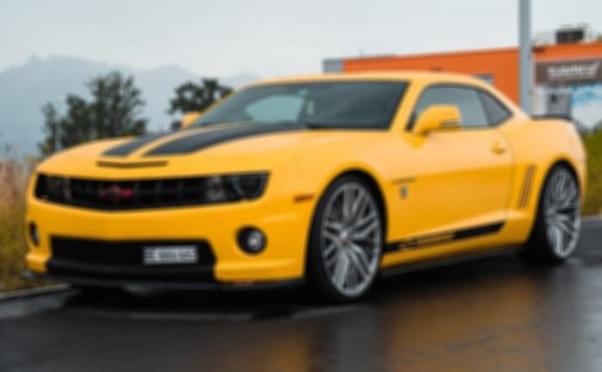
box_blurred_image = original_image.filter(ImageFilter.BoxBlur(radius=3))

# Display the Box Blurred image
box_blurred_image.show()
Output Image
Applying the Gaussian Blur to an Image
The GaussianBlur filter is used to blur an image by applying a Gaussian blur, which is a specific type of blur that approximates a Gaussian distribution. This can be done by using the Pillow's ImageFilter.GaussianBlur() class.
Below is the syntax of the ImageFilter.GaussianBlur() class −
class PIL.ImageFilter.GaussianBlur(radius=2)
The ImageFilter.GaussianBlur() class accepts a single parameter −
radius − This parameter specifies the standard deviation of the Gaussian kernel. The standard deviation controls the extent of blurring. You can provide it as either a sequence of two numbers (for the x and y directions) or a single number that applies to both directions.
Example - Applying Gaussian Blur to an Image
Here's an example that demonstrates how to use the GaussianBlur() class for image blurring.
main.py
from PIL import Image, ImageFilter

# Open an existing image
original_image = Image.open('Images/yellow_car.jpg')

# Apply a Gaussian Blur filter to the image
gaussian_blurred_image = original_image.filter(ImageFilter.GaussianBlur(radius=2))

# Display the Gaussian Blurred image
gaussian_blurred_image.show()
Output Image