
- Python Network Programming - Home
- Python Network Introduction
- Python Networking - Environment Setup
- Python Networking - Internet Protocol
- Python Networking - IP Address
- Python Networking - DNS Lookup
- Python Networking - Routing
- Python Networking - HTTP Requests
- Python Networking - HTTP Response
- Python Networking - HTTP Headers
- Python Networking - Custom HTTP Requests
- Python Networking - Request Status Codes
- Python Networking - HTTP Authentication
- Python Networking - HTTP Data Download
- Python Networking - Connection Re-use
- Python Networking - Network Interface
- Python Networking - Sockets Programming
- Python Networking - HTTP Client
- Python Networking - HTTP Server
- Python Networking - Building URLs
- Python Networking - WebForm Submission
- Python Networking - Databases and SQL
- Python Networking - Telnet
- Python Networking - Email Messages
- Python Networking - SMTP
- Python Networking - POP3
- Python Networking - IMAP
- Python Networking - SSH
- Python Networking - FTP
- Python Networking - SFTP
- Python Networking - Web Servers
- Python Networking - Uploading Data
- Python Networking - Proxy Server
- Python Networking - Directory Listing
- Python Networking - Remote Procedure Call
- Python Networking - RPC JSON Server
- Python Networking - Google Maps
- Python Networking - RSS Feed
Python Network Programming Resources
Python Network - Routing
Routing is the mechanism of mapping the URL directly to the code that creates the webpage. It helps in better management of the structure of the webpage and increases the performance of the site considerably and further enhancements or modifications become really straight forward. In python routing is implemented in most of the web frame works. We will see the examples from flask web framework in this chapter.
Install Flask
pip3 install flask
Collecting flask
  Downloading flask-3.1.3-py3-none-any.whl.metadata (3.2 kB)
...
Installing collected packages: werkzeug, itsdangerous, blinker, flask
Successfully installed blinker-1.9.0 flask-3.1.3 itsdangerous-2.2.0 werkzeug-3.1.6
Routing in Flask
The route() decorator in Flask is used to bind an URL to a function. As a result when the URL is mentioned in the browser, the function is executed to give the result. Here, URL '/hello' rule is bound to the hello_world() function. As a result, if a user visits http://localhost:5000/ URL, the output of the hello_world() function will be rendered in the browser.
main.py
from flask import Flask
app = Flask(__name__)

@app.route('/')
def hello_world():
   return 'Hello Tutorialspoint'

if __name__ == '__main__':
   app.run()
Output
When we run the above program, we get the following output −
 * Serving Flask app "flask_route" (lazy loading)
 * Environment: production
   WARNING: Do not use the development server in a production environment.
   Use a production WSGI server instead.
 * Debug mode: off
 * Running on http://127.0.0.1:5000/ (Press CTRL+C to quit)
127.0.0.1 - - [06/Aug/2018 08:48:45] "GET / HTTP/1.1" 200 -
127.0.0.1 - - [06/Aug/2018 08:48:46] "GET /favicon.ico HTTP/1.1" 404 -
127.0.0.1 - - [06/Aug/2018 08:48:46] "GET /favicon.ico HTTP/1.1" 404 -
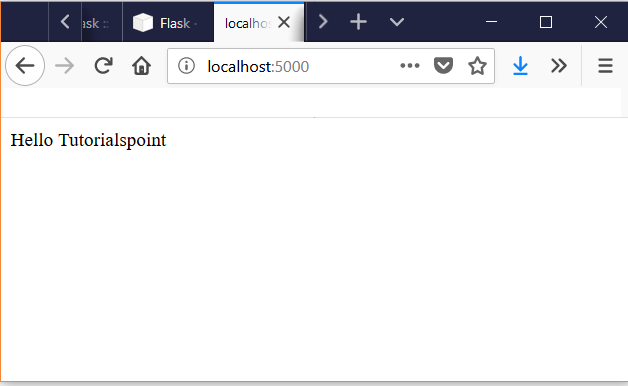
We open the browser and point to the URL http://localhost:5000/ to see the result of the function being executed.
Using URL Variables
We can pass on URL variables using route to build URLS on the fly. For this we use the url_for() function which accepts name of the function as the first argument and the rest of the arguments as variable part of the URL rule.
In the below example we pass the function names as arguments to the url_for function and print out the result when those lines are executed.
main.py
from flask import Flask, url_for
app = Flask(__name__)

@app.route('/')
def index(): pass

@app.route('/login')
def login(): pass

@app.route('/user/<username>')
def profile(username): pass

with app.test_request_context():
    print url_for('index')
    print url_for('index', _external=True)
    print url_for('login')
    print url_for('login', next='/')
    print url_for('profile', username='Tutorials Point')
</username>
Output
When we run the above program, we get the following output −
/
http://localhost/
/login
/login?next=%2F
/user/Tutorials%20Point
Redirects
We can use the redirect function to redirect the user to another URL using routing. We mention the new URL as a return value of the function whihc should redirect the user. This is helpful when we temporarily divert the users to a different page when we are modifying an existing webpage.
main.py
from flask import Flask, abort, redirect, url_for
app = Flask(__name__)

@app.route('/')
def index():
    return redirect(url_for('login'))

@app.route('/login')
def login():
    abort(401)
#    this_is_never_executed()
When the above code is executed, the base URL goes to login page which uses the abort function so that the code for login page is never executed.
