
- Python Text Processing - Home
- Python Text Processing - Introduction
- Python Text Processing - Environment
- Python Text Processing - String Immutability
- Python Text Processing - Sorting Lines
- Python Text Processing - Counting Token in Paragraphs
- Python Text Processing - Binary ASCII Conversion
- Python Text Processing - Strings as Files
- Python Text Processing - Backward File Reading
- Python Text Processing - Filter Duplicate Words
- Python Text Processing - Extract Emails from Text
- Python Text Processing - Extract URL from Text
- Python Text Processing - Pretty Print
- Python Text Processing - State Machine
- Python Text Processing - Capitalize and Translate
- Python Text Processing - Tokenization
- Python Text Processing - Remove Stopwords
- Python Text Processing - Synonyms and Antonyms
- Python Text Processing - Translation
- Python Text Processing - Word Replacement
- Python Text Processing - Spelling Check
- Python Text Processing - WordNet Interface
- Python Text Processing - Corpora Access
- Python Text Processing - Tagging Words
- Python Text Processing - Chunks and Chinks
- Python Text Processing - Chunk Classification
- Python Text Processing - Classification
- Python Text Processing - Bigrams
- Python Text Processing - Process PDF
- Python Text Processing - Process Word Document
- Python Text Processing - Reading RSS feed
- Python Text Processing - Sentiment Analysis
- Python Text Processing - Search and Match
- Python Text Processing - Text Munging
- Python Text Processing - Text wrapping
- Python Text Processing - Frequency Distribution
- Python Text Processing - Summarization
- Python Text Processing - Stemming Algorithms
- Python Text Processing - Constrained Search
Python Text Processing Useful Resources
- Python Text Processing - Quick Guide
- Python Text Processing - Useful Resources
- Python Text Processing - Discussion
Python Text Processing - Quick Guide
Python Text Processing - Introduction
Text processing has a direct application to Natural Language Processing, also known as NLP. NLP is aimed at processing the languages spoken or written by humans when they communicate with one another. This is different from the communication between a computer and a human where the communication is wither a computer program written by human or some gesture by human like clicking the mouse at some position. NLP tries to understand the natural language spoken by humans and classify it, analyses it as well if required respond to it. Python has a rich set of libraries which cater to the needs of NLP. The Natural Language Tool Kit (NLTK) is a suite of such libraries which provides the functionalities required for NLP.
Below are some applications which use NLP and indirectly python's NLTK.
Summarization
Many times, we need to get the summary of a news article, a movie plot or a big story. They are all written in human language and without NLP we have to rely on another human's interpretation and presentation of such summary to us. But with help of NLP we can write programs to use NLTK and summarize the long text with various parameters, like what is the percentage of text we want in the final output, choosing the positive and negative words for summarization etc. The online news feeds rely on such summarization techniques to present news insights.
Voice Based Tools
The voice-based tools like apples Siri or Amazon Alexa rely on NLP to understand the interaction mad with humans. They have a large training data set of words, sentences and grammar to interpret the question or command coming from a human and process it. Though it is about voice, indirectly it also gets translated to text and the resulting text form the voice is taken through the NLP system to produce result.
Information Extraction
Web scrapping is a common example of extracting data form the web pages using python code. Here it may not be strictly NLP based but it does involve text processing. For example, if we need to extract only the headers present in a html page, then we look for the h1 tag int he page structure and find a way to extract the text between only those tags. This need text processing program from python.
Spam Filtering
The spam in emails can be identified and eliminated by analysing the text in the subject line as well as in the content of the message. As the spam emails are usually sent in bulk to many recipients, even if their subjects and contents have little variation, that can be matched and tagged to mark them as spam Again it needs the use of the NLTK libraries.
Language Translation
Computerized language translation relies heavily on NLP. As more and more languages are used in the online platform, it becomes a necessity to automate the translation from one human language to another. This will involve programming to handle the vocabulary, grammar and context tagging of the languages involved in translation. Again, NLTK is used to handle such requirements.
Sentiment Analysis
To find out the overall reaction to the performance of a movie, we may have to read thousands of feedback posts from the audience. But that too can be automated by using the classification of positive an negative feedback through words and sentence analysis. And then measuring the frequency of positive and negative reviews to find the overall sentiment of the audience. This obviously needs the analysis of the human language written by the audience and NLTK is used heavily here for processing the text.
Python Text Processing - Environment Setup
To successfully create and run the example code in this tutorial we will need an environment set up which will have both general-purpose python as well as the special packages required for Data science. We will first look as installing the general-purpose python which can be python 2 or python 3. But we will prefer python 2 for this tutorial mainly because of its maturity and wider support of external packages.
Getting Python
The most up-to-date and current source code, binaries, documentation, news, etc., is available on the official website of Python https://www.python.org/
You can download Python documentation from https://www.python.org/doc/. The documentation is available in HTML, PDF, and PostScript formats.
Installing Python
Python distribution is available for a wide variety of platforms. You need to download only the binary code applicable for your platform and install Python.
If the binary code for your platform is not available, you need a C compiler to compile the source code manually. Compiling the source code offers more flexibility in terms of choice of features that you require in your installation.
Here is a quick overview of installing Python on various platforms −
Unix and Linux Installation
Here are the simple steps to install Python on Unix/Linux machine.
Open a Web browser and go to https://www.python.org/downloads/.
Follow the link to download zipped source code available for Unix/Linux.
Download and extract files.
Editing the Modules/Setup file if you want to customize some options.
run ./configure script
make
make install
This installs Python at standard location /usr/local/bin and its libraries at /usr/local/lib/pythonXX where XX is the version of Python.
Windows Installation
Here are the steps to install Python on Windows machine.
Open a Web browser and go to https://www.python.org/downloads/.
Follow the link for the Windows installer python-XYZ.msi file where XYZ is the version you need to install.
To use this installer python-XYZ.msi, the Windows system must support Microsoft Installer 2.0. Save the installer file to your local machine and then run it to find out if your machine supports MSI.
Run the downloaded file. This brings up the Python install wizard, which is really easy to use. Just accept the default settings, wait until the install is finished, and you are done.
Macintosh Installation
Recent Macs come with Python installed, but it may be several years out of date. See http://www.python.org/download/mac/ for instructions on getting the current version along with extra tools to support development on the Mac. For older Mac OS's before Mac OS X 10.3 (released in 2003), MacPython is available.
Jack Jansen maintains it and you can have full access to the entire documentation at his website − https://homepages.cwi.nl/~jack/macpython/index.html. You can find complete installation details for Mac OS installation.
Setting up PATH
Programs and other executable files can be in many directories, so operating systems provide a search path that lists the directories that the OS searches for executables.
The path is stored in an environment variable, which is a named string maintained by the operating system. This variable contains information available to the command shell and other programs.
The path variable is named as PATH in Unix or Path in Windows (Unix is case sensitive; Windows is not).
In Mac OS, the installer handles the path details. To invoke the Python interpreter from any particular directory, you must add the Python directory to your path.
Setting path at Unix/Linux
To add the Python directory to the path for a particular session in Unix −
In the csh shell − type setenv PATH "$PATH:/usr/local/bin/python" and press Enter.
In the bash shell (Linux) − type export ATH="$PATH:/usr/local/bin/python" and press Enter.
In the sh or ksh shell − type PATH="$PATH:/usr/local/bin/python" and press Enter.
Note − /usr/local/bin/python is the path of the Python directory
Setting path at Windows
To add the Python directory to the path for a particular session in Windows −
At the command prompt − type path %path%;C:\Python and press Enter.
Note − C:\Python is the path of the Python directory
Python Environment Variables
Here are important environment variables, which can be recognized by Python −
| Sr.No. | Variable & Description |
|---|---|
| 1 | PYTHONPATH It has a role similar to PATH. This variable tells the Python interpreter where to locate the module files imported into a program. It should include the Python source library directory and the directories containing Python source code. PYTHONPATH is sometimes preset by the Python installer. |
| 2 | PYTHONSTARTUP It contains the path of an initialization file containing Python source code. It is executed every time you start the interpreter. It is named as .pythonrc.py in Unix and it contains commands that load utilities or modify PYTHONPATH. |
| 3 | PYTHONCASEOK It is used in Windows to instruct Python to find the first case-insensitive match in an import statement. Set this variable to any value to activate it. |
| 4 | PYTHONHOME It is an alternative module search path. It is usually embedded in the PYTHONSTARTUP or PYTHONPATH directories to make switching module libraries easy. |
Running Python
There are three different ways to start Python −
Interactive Interpreter
You can start Python from Unix, DOS, or any other system that provides you a command-line interpreter or shell window.
Enter python the command line.
Start coding right away in the interactive interpreter.
$py # Unix/Linux
or
py% # Unix/Linux
or
C:> py # Windows/DOS
Here is the list of all the available command line options −
| Sr.No. | Option & Description |
|---|---|
| 1 | -d It provides debug output. |
| 2 | -O It generates optimized bytecode (resulting in .pyo files). |
| 3 | -S Do not run import site to look for Python paths on startup. |
| 4 | -v verbose output (detailed trace on import statements). |
| 5 | -X disable class-based built-in exceptions (just use strings); obsolete starting with version 1.6. |
| 6 | -c cmd run Python script sent in as cmd string |
| 7 | file run Python script from given file |
Script from the Command-line
A Python script can be executed at command line by invoking the interpreter on your application, as in the following −
$py script.py # Unix/Linux

or

py% script.py # Unix/Linux

or

C: >py script.py # Windows/DOS
Note − Be sure the file permission mode allows execution.
Integrated Development Environment
You can run Python from a Graphical User Interface (GUI) environment as well, if you have a GUI application on your system that supports Python.
Unix − IDLE is the very first Unix IDE for Python.
Windows − PythonWin is the first Windows interface for Python and is an IDE with a GUI.
Macintosh − The Macintosh version of Python along with the IDLE IDE is available from the main website, downloadable as either MacBinary or BinHex'd files.
Installing NLTK Pack
NLTK is very straight forward to integrate into the python environment. Use the below command to add NLTK to the environment.
sudo pip install -U nltk
The addition of other libraries will be discussed in each chapter as and when we need for their use in the python program.
Python Text Processing - String Immutability
In python, the string data types are immutable. Which means a string value cannot be updated. We can verify this by trying to update a part of the string which will led us to an error.
Checking Immutability of a String
main.py
# Can not reassign
t= "Tutorialspoint"
print(type(t))
t[0] = "M"
Output
When we run the above program, we get the following output −
<class 'str'>

Warnings/Errors:
Traceback (most recent call last):
  File "/home/cg/root/31c1433c/main.py", line 4, in <module>
    t[0] = "M"
    ~^^^
TypeError: 'str' object does not support item assignment
Checking Memory Location of Letters of a String
We can further verify this by checking the memory location address of the position of the letters of the string.
main.py
x = 'banana'

for idx in range (0,5):
    print(x[idx], "=", id(x[idx]))
Output
When we run the above program we get the following output. As you can see above a and a point to same location. Also N and N also point to the same location.
b = 11817208
a = 11817160
n = 11817784
a = 11817160
n = 11817784
Python Text Processing - Sorting Lines
Many times, we need to sort the content of a file for analysis. For example, we want to get the sentences written by different students to get arranged in the alphabetical order of their names. That will involve sorting just not by the first character of the line but also all the characters starting from the left. In the below program we first read the lines from a file then print them using the sort function which is part of the standard python library.
Printing the File Content
main.py
fileName = "poem.txt"
data=file(fileName).readlines()
for i in range(len(data)):
   print(data[i])
Output
When we run the above program, we get the following output −
Summer is here.
Sky is bright.
Birds are gone.
Nests are empty.
Where is Rain?
Sorting Lines in the File
Now we apply the sort function before printing the content of the file. the lines get sorted as per the first alphabet form the left.
main.py
FileName = "poem.txt"
data=file(fileName).readlines()
data.sort()
for i in range(len(data)):
    print(data[i])
Output
When we run the above program, we get the following output −
Birds are gone.
Nests are empty.
Sky is bright.
Summer is here.
Where is Rain?
Python Text Processing - Counting Tokens in Paragraphs
While reading the text from a source, sometimes we also need to find out some statistics about the type of words used. That makes it necessary to count the number of words as well as lines with a specific type of words in a given text. In the below example we show programs to count the words in a paragraph using two different approaches. We consider a text file for this purpose which contains the summary of a Hollywood movie.
Reading the File
main.py
fileName = "GodFather.txt"

with open(fileName, 'r') as file:
    lines_in_file = file.read()
    print(lines_in_file)
Output
When we run the above program we get the following output −
Vito Corleone is the aging don (head) of the Corleone Mafia Family.
His youngest son Michael has returned from WWII just in time to see
the wedding of Connie Corleone (Michael's sister) to Carlo Rizzi.
...
Counting Words Using nltk
Next we use the nltk module to count the words in the text. Please note the word '(head)' is counted as 3 words and not one.
main.py
import nltk

fileName = "GodFather.txt"

with open(fileName, 'r') as file:
    lines_in_file = file.read()

    nltk_tokens = nltk.word_tokenize(lines_in_file)
    print(nltk_tokens)
    print("\n")
    print("Number of Words: " , len(nltk_tokens))
Output
When we run the above program we get the following output −
['Vito', 'Corleone', 'is', 'the', 'aging', 'don',
...
]

Number of Words:  167
Counting Words Using Split
Next we count the words using Split function and here the word '(head)' is counted as a single word and not 3 words as in case of using nltk.
fileName = "GodFather.txt"

with open(fileName, 'r') as file:
    lines_in_file = file.read()

    print(lines_in_file.split())
    print("\n")
    print("Number of Words: ", len(lines_in_file.split()))
Output
When we run the above program we get the following output −
['Vito', 'Corleone', 'is', 'the', 'aging', 'don',
...
]

Number of Words:  146
Python Text Processing - Binary ASCII Conversion
The ASCII to binary and binary to ascii conversion is carried out by the in-built binascii module. It has a very straight forward usage with functions which take the input data and do the conversion. The below program shows the use of binascii module and its functions named b2a_uu and a2b_uu. The uu stands for "UNIX-to-UNIX encoding" which takes care of the data conversion from strings to binary and ascii values as required by the program.
Binary ASCII Conversion
main.py
import binascii

text = b"Simply Easy Learning"

# Converting binary to ascii
data_b2a = binascii.b2a_uu(text)
print("**Binary to Ascii** \n")
print(data_b2a)

# Converting back from ascii to binary
data_a2b = binascii.a2b_uu(data_b2a)
print("**Ascii to Binary** \n")
print(data_a2b)
Output
When we run the above program we get the following output −
**Binary to Ascii**

b'44VEM<&QY($5A<WD@3&5A<FYI;F< \n'
**Ascii to Binary**

b'Simply Easy Learning'
Python Text Processing - File as String
While reading a file it is read as a dictionary with multiple elements. So, we can access each line of the file using the index of the element. In the below example we have a file which has multiple lines and they those lines become individual elements of the file.
Example - Reading a File line by line
main.py
with open ("GodFather.txt", "r") as BigFile:
    data=BigFile.readlines()

# Print each line
	for i in range(len(data)):
    print("Line No -",i)
    print(data[i])
When we run the above program, we get the following output −
Line No - 0
Vito Corleone is the aging don (head) of the Corleone Mafia Family.
...
File as a String
But the entire file content can be read as a single string by removing the new line character and using the read function as shown below. In the result there are no multiple lines.
main.py
with open("GodFather.txt", 'r') as BigFile:
    data=BigFile.read().replace('\n', '')

# Verify the string type
	print(type(data))

# Print the file content as a single string
    print(data)
Output
When we run the above program, we get the following output −
string
Vito Corleone is the aging don (head) of the Corleone Mafia Family...
Python Text Processing - Backward File Reading
When we normally read a file, the contents are read line by line from the beginning of the file. But there may be scenarios where we want to read the last line first. For example, the data in the file has latest record in the bottom and we want to read the latest records first. To achieve this requirement we install the required package to perform this action by using the command below.
pip3 install file-read-backwards
Example - Reading File Line By Line
But before reading the file backwards, let's read the content of the file line by line so that we can compare the result after backward reading.
main.py
with open ("GodFather.txt", "r") as BigFile:
    data=BigFile.readlines()

# Print each line
	for i in range(len(data)):
    print("Line No- ",i )
    print(data[i])
Output
When we run the above program, we get the following output −
Line No-  0
Vito Corleone is the aging don (head) of the Corleone Mafia Family.

Line No-  1
His youngest son Michael has returned from WWII just in time to ...
Example - Reading Lines Backward
Now to read the file backwards we use the installed module.
main.py
from file_read_backwards import FileReadBackwards

with FileReadBackwards("GodFather.txt", encoding="utf-8") as BigFile:

# getting lines by lines starting from the last line up
    for line in BigFile:
        print(line)
Output
When we run the above program, we get the following output −
The Don barely survives, which leads his son Michael to begin a violent...
You can verify the lines have been read in a reverse order.
Reading Words Backward
We can also read the words in the file backward. For this we first read the lines backwards and then tokenize the words in it with applying reverse function. In the below example we have word tokens printed backwards form the same file using both the package and nltk module.
main.py
import nltk
from file_read_backwards import FileReadBackwards

with FileReadBackwards("GodFather.txt", encoding="utf-8") as BigFile:

# getting lines by lines starting from the last line up
# And tokenizing with applying reverse()
    for line in BigFile:
        word_data= line
        nltk_tokens = nltk.word_tokenize(word_data)
        nltk_tokens.reverse()
        print(nltk_tokens)
Output
When we run the above program we get the following output −
['.', 'apart', 'family', 'Corleone'..., 'The']
['.', 'men', 'hit', 'his', 'of', 'some', ...'This']
...
Python Text Processing - Filter Duplicate Words
Many times, we have a need of analysing the text only for the unique words present in the file. So, we need to eliminate the duplicate words from the text. This is achieved by using the word tokenization and set functions available in nltk.
Example - Without preserving the order
In the below example we first tokenize the sentence into words. Then we apply set() function which creates an unordered collection of unique elements. The result has unique words which are not ordered.
main.py
from nltk.tokenize import word_tokenize
word_data = "The Sky is blue also the ocean is blue also Rainbow has a blue colour."

# First Word tokenization
nltk_tokens = word_tokenize(word_data)

# Applying Set
no_order = list(set(nltk_tokens))

print(no_order)
Output
When we run the above program, we get the following output −
['is', 'Rainbow', 'ocean', 'the', 'has', 'The', 'Sky', '.', 'a', 'also', 'colour', 'blue']
Preserving the Order
To get the words after removing the duplicates but still preserving the order of the words in the sentence, we read the words and add it to list by appending it.
main.py
from nltk.tokenize import word_tokenize
word_data = "The Sky is blue also the ocean is blue also Rainbow has a blue colour."

# First Word tokenization
nltk_tokens = word_tokenize(word_data)

ordered_tokens = set()
result = []
for word in nltk_tokens:
    if word not in ordered_tokens:
        ordered_tokens.add(word)
        result.append(word)

print(result)
Output
When we run the above program, we get the following output −
['The', 'Sky', 'is', 'blue', 'also', 'the', 'ocean', 'Rainbow', 'has', 'a', 'colour', '.']
Python Text Processing - Extract Emails from Text
To extract emails form text, we can take of regular expression. In the below example we take help of the regular expression package to define the pattern of an email ID and then use the findall() function to retrieve those text which match this pattern.
Example - Extracting Email
main.py
import re
text = "Please contact us at [email protected] for further information." + \
        " You can also give feedbacl at [email protected]"

emails = re.findall(r"[a-z0-9\.\-+_]+@[a-z0-9\.\-+_]+\.[a-z]+", text)
print(emails)
Output
When we run the above program, we get the following output −
['[email protected]', '[email protected]']
Python Text Processing - Extract URL from Text
URL extraction is achieved from a text file by using regular expression. The expression fetches the text wherever it matches the pattern. Only the re module is used for this purpose.
Example - Reading URLs from a file
We can take a input file containig some URLs and process it thorugh the following program to extract the URLs. The findall()function is used to find all instances matching with the regular expression.
Inout File - url_example.txt
Shown is the input file below. Which contains teo URLs.
Now a days you can learn almost anything by just visiting http://www.google.com.
But if you are completely new to computers or internet then first you need to
learn those fundamentals. Next you can visit a good e-learning site like
- https://www.tutorialspoint.com to learn further on a variety of subjects.
Now, when we take the above input file and process it through the following program we get the required output whihc gives only the URLs extracted from the file.
main.py
import re

with open("url_example.txt") as file:
   for line in file:
      urls = re.findall('https?://(?:[-\w.]|(?:%[\da-fA-F]{2}))+', line)
      print(urls)
Output
When we run the above program we get the following output −
['http://www.google.com.']
['https://www.tutorialspoint.com']
Python Text Processing - Pretty Printing
The python module pprint is used for giving proper printing formats to various data objects in python. Those data objects can represent a dictionary data type or even a data object containing the JSON data. In the below example we see how that data looks before applying the pprint module and after applying it.
Pretty Print a Dictionary
main.py
import pprint

student_dict = {'Name': 'Tusar', 'Class': 'XII',
     'Address': {'FLAT ':1308, 'BLOCK ':'A', 'LANE ':2, 'CITY ': 'HYD'}}

print(student_dict)
print("\n")
print("***With Pretty Print***")
print("-----------------------")
pprint.pprint(student_dict,width=-1)
Output
When we run the above program, we get the following output −
{'Address': {'FLAT ': 1308, 'LANE ': 2, 'CITY ': 'HYD', 'BLOCK ': 'A'},
'Name': 'Tusar', 'Class': 'XII'}


***With Pretty Print***
-----------------------
{'Address': {'BLOCK ': 'A',
             'CITY ': 'HYD',
             'FLAT ': 1308,
             'LANE ': 2},
 'Class': 'XII',
 'Name': 'Tusar'}
Example - Handling JSON Data
Pprint can also handle JSON data by formatting them to a more readable format.
main.py
import pprint

emp = {"Name":["Rick","Dan","Michelle","Ryan","Gary","Nina","Simon","Guru" ],
   "Salary":["623.3","515.2","611","729","843.25","578","632.8","722.5" ],
   "StartDate":[ "1/1/2012","9/23/2013","11/15/2014","5/11/2014","3/27/2015","5/21/2013",
      "7/30/2013","6/17/2014"],
   "Dept":[ "IT","Operations","IT","HR","Finance","IT","Operations","Finance"] }

x= pprint.pformat(emp, indent=2)
print(x)
Output
When we run the above program, we get the following output −
{ 'Dept': [ 'IT',
            'Operations',
            'IT',
            'HR',
            'Finance',
            'IT',
            'Operations',
            'Finance'],
  'Name': ['Rick', 'Dan', 'Michelle', 'Ryan', 'Gary', 'Nina', 'Simon', 'Guru'],
  'Salary': [ '623.3',
              '515.2',
              '611',
              '729',
              '843.25',
              '578',
              '632.8',
              '722.5'],
  'StartDate': [ '1/1/2012',
                 '9/23/2013',
                 '11/15/2014',
                 '5/11/2014',
                 '3/27/2015',
                 '5/21/2013',
                 '7/30/2013',
                 '6/17/2014']}
Python Text Processing - State Machine
A state machine is about designing a program to control the flow in an application. it is a directed graph, consisting of a set of nodes and a set of transition functions. Processing a text file very often consists of sequential reading of each chunk of a text file and doing something in response to each chunk read. The meaning of a chunk depends on what types of chunks were present before it and what chunks come after it. The machine is about designing a program to control the flow in an application. it is a directed graph, consisting of a set of nodes and a set of transition functions. Processing a text file very often consists of sequential reading of each chunk of a text file and doing something in response to each chunk read. The meaning of a chunk depends on what types of chunks were present before it and what chunks come after it.
Consider a scenario where the text put has to be a continuous string of repetition of sequence of AGC(used in protein analysis). If this specific sequence is maintained in the input string the state of the machine remains TRUE but as soon as the sequence deviates, the state of the machine becomes FALSE and remains FALSE after wards. This ensures the further processing is stopped even though there may be more chunks of correct sequences available later.
Defining a State Machine
The below program defines a state machine which has functions to start the machine, take inputs for processing the text and step through the processing.
main.py
class StateMachine:

# Initialize
    def start(self):
        self.state = self.startState

# Step through the input
    def step(self, inp):
        (s, o) = self.getNextValues(self.state, inp)
        self.state = s
        return o

# Loop through the input
    def feeder(self, inputs):
        self.start()
        return [self.step(inp) for inp in inputs]

# Determine the TRUE or FALSE state
class TextSeq(StateMachine):
    startState = 0
    def getNextValues(self, state, inp):
        if state == 0 and inp == 'A':
            return (1, True)
        elif state == 1 and inp == 'G':
            return (2, True)
        elif state == 2 and inp == 'C':
            return (0, True)
        else:
            return (3, False)


InSeq = TextSeq()

x = InSeq.feeder(['A','A','A'])
print(x)

y = InSeq.feeder(['A', 'G', 'C', 'A', 'C', 'A', 'G'])
print(y)
Output
When we run the above program, we get the following output −
[True, False, False]
[True, True, True, True, False, False, False]
In the result of x, the pattern of AGC fails for the second input after the first 'A'. The state of the result remains False forever after this. In the result of Y, the pattern of AGC continues till the 4th input. Hence the state of the result remains True till that point. But from 5th input the result changes to False as G is expected, but C is found.
Python Text Processing - Capitalize and Translate
Capitalization strings is a regular need in any text processing system. Python achieves it by using the built-in functions in the standard library. In the below example we use the two string functions, capwords() and upper() to achieve this. While 'capwords' capitalizes the first letter of each word, 'upper' capitalizes the entire string.
Example - Capitalization of Strings
main.py
import string

text = 'Tutorialspoint - simple easy learning.'

print(string.capwords(text))
print(text.upper())
Output
When we run the above program we get the following output −
Tutorialspoint - Simple Easy Learning.
TUTORIALSPOINT - SIMPLE EASY LEARNING.
Example - Translation of Strings
Translation in python essentially means substituting specific letters with another letter. It can work for encryption decryption of strings.
main.py
text = 'Tutorialspoint - simple easy learning.'

transtable = str.maketrans('tpol', 'wxyz')
print(text.translate(transtable))
Output
When we run the above program we get the following output −
Tuwyriazsxyinw - simxze easy zearning.
Python Text Processing - Tokenization
In Python tokenization basically refers to splitting up a larger body of text into smaller lines, words or even creating words for a non-English language. The various tokenization functions in-built into the nltk module itself and can be used in programs as shown below.
Line Tokenization
In the below example we divide a given text into different lines by using the function sent_tokenize.
main.py
import nltk
sentence_data = "The First sentence is about Python." + \
   "The Second: about Django. You can learn Python,Django and Data Ananlysis here. "
nltk_tokens = nltk.sent_tokenize(sentence_data)
print (nltk_tokens)
When we run the above program, we get the following output −
['The First sentence is about Python.',
'The Second: about Django.',
'You can learn Python,Django and Data Ananlysis here.']
Non-English Tokenization
In the below example we tokenize the German text.
main.py
import nltk

german_tokenizer = nltk.data.load('tokenizers/punkt/german.pickle')
german_tokens=german_tokenizer.tokenize('Wie geht es Ihnen?  Gut, danke.')
print(german_tokens)
Output
When we run the above program, we get the following output −
['Wie geht es Ihnen?', 'Gut, danke.']
Word Tokenzitaion
We tokenize the words using word_tokenize function available as part of nltk.
main.py
import nltk

word_data = "It originated from the idea that there are readers" + \
   "who prefer learning new skills from the comforts of their drawing rooms"
nltk_tokens = nltk.word_tokenize(word_data)
print (nltk_tokens)
Output
When we run the above program we get the following output −
['It', 'originated', 'from', 'the', 'idea', 'that', 'there', 'are', 'readers',
'who', 'prefer', 'learning', 'new', 'skills', 'from', 'the',
'comforts', 'of', 'their', 'drawing', 'rooms']
Python Text Processing - Removing Stopwords
Stopwords are the English words which does not add much meaning to a sentence. They can safely be ignored without sacrificing the meaning of the sentence. For example, the words like the, he, have etc. Such words are already captured this in corpus named corpus. We first download it to our python environment.
import nltk
nltk.download('stopwords')
It will download a file with English stopwords.
Verifying the Stopwords
main.py
from nltk.corpus import stopwords
stopwords.words('english')
print (stopwords.words() [0:20])
Output
When we run the above program we get the following output −
['tyre', 'rreth', 'le', 'atyre', 'këta', 'megjithëse', 'kemi', 'per',
'ndonëse', 'dytë', 'pse', 'tha', 'aty', 'ndaj', 'ke', 'këtë', 'duhet',
'pa', 'perket', 'veç']
The various language other than English which has these stopwords are as below.
main.py
from nltk.corpus import stopwords
print(stopwords.fileids())
Output
When we run the above program we get the following output −
['albanian', 'arabic', 'azerbaijani', 'basque', 'belarusian', 'bengali', 'catalan',
'chinese', 'danish', 'dutch', 'english', 'finnish', 'french', 'german', 'greek',
 'hebrew', 'hinglish', 'hungarian', 'indonesian', 'italian', 'kazakh', 'nepali',
 'norwegian', 'portuguese', 'romanian', 'russian', 'slovene', 'spanish', 'swedish',
 'tajik', 'tamil', 'turkish', 'uzbek']
Example - Removing stopwords
We use the below example to show how the stopwords are removed from the list of words.
main.py
from nltk.corpus import stopwords
en_stops = set(stopwords.words('english'))

all_words = ['There', 'is', 'a', 'tree','near','the','river']
for word in all_words:
    if word not in en_stops:
        print(word)
Output
When we run the above program we get the following output −
There
tree
near
river
Python Text Processing - Synonyms and Antonyms
Synonyms and Antonyms are available as part of the wordnet which a lexical database for the English language. It is available as part of nltk corpora access. In wordnet Synonyms are the words that denote the same concept and are interchangeable in many contexts so that they are grouped into unordered sets (synsets). We use these synsets to derive the synonyms and antonyms as shown in the below programs.
Example - Getting Synonyms
main.py
from nltk.corpus import wordnet

synonyms = []

for syn in wordnet.synsets("Soil"):
   for lm in syn.lemmas():
      synonyms.append(lm.name())
print (set(synonyms))
Output
When we run the above program we get the following output −
set([grease', filth', dirt', begrime', soil',
grime', land', bemire', dirty', grunge',
stain', territory', colly', ground'])
Example - Getting Antonyms
To get the antonyms we simply uses the antonym function.
main.py
from nltk.corpus import wordnet
antonyms = []

for syn in wordnet.synsets("ahead"):
   for lm in syn.lemmas():
      if lm.antonyms():
          antonyms.append(lm.antonyms()[0].name())

print(set(antonyms))
Output
When we run the above program, we get the following output −
set([backward', back'])
Python Text Processing - Text Translation
Text translation from one language to another is increasingly becoming common for various websites as they cater to an international audience. The python package which helps us do this is called translate.
This package can be installed by the following way. It provides translation for major languages.
pip3 install translate
Example - Translating a Sentence
Below is an example of translating a simple sentence from English to Spanish. The default from language being English.
main.py
from translate import Translator
translator= Translator(to_lang="es")
translation = translator.translate("Good Morning!")
print translation
Output
When we run the above program, we get the following output −
¡Buenos días!
Example - Translation Between Any Two Languages
If we have the need specify the from-language and the to-language, then we can specify it as in the below program.
main.py
from translate import Translator
translator= Translator(from_lang="es",to_lang="en")
translation = translator.translate("¡Buenos días!")
print(translation)
Output
When we run the above program, we get the following output −
Good Morning!
Python Text Processing - Word Replacement
Replacing the complete string or a part of string is a very frequent requirement in text processing. The replace() method returns a copy of the string in which the occurrences of old have been replaced with new, optionally restricting the number of replacements to max.
Following is the syntax for replace() method −
str.replace(old, new[, max])
Parameters
old − This is old substring to be replaced.
new − This is new substring, which would replace old substring.
max − If this optional argument max is given, only the first count occurrences are replaced.
This method returns a copy of the string with all occurrences of substring old replaced by new. If the optional argument max is given, only the first count occurrences are replaced.
Example
Example - Usage of replace() method
The following example shows the usage of replace() method.
main.py
str = "this is string example....wow!!! this is really string"
print(str.replace("is", "was"))
print(str.replace("is", "was", 3))
Result
When we run above program, it produces the following result −
thwas was string example....wow!!! thwas was really string
thwas was string example....wow!!! thwas is really string
Example - Replacement Ignoring Case
main.py
import re
sourceline  = re.compile("Tutor", re.IGNORECASE)

Replacedline  = sourceline.sub("Tutor","Tutorialspoint has the best tutorials for learning.")
print (Replacedline)
Output
When we run the above program, we get the following output −
Tutorialspoint has the best Tutorials for learning.
Python Text Processing - Spell Check
Checking of spelling is a basic requirement in any text processing or analysis. The python package pyspellchecker provides us this feature to find the words that may have been mis-spelled and also suggest the possible corrections.
First, we need to install the required package using the following command in our python environment.
pip3 install pyspellchecker
Example - Spell Check
Now we see below how the package is used to point out the wrongly spelled words as well as make some suggestions about possible correct words.
main.py
from spellchecker import SpellChecker

spell = SpellChecker()

# find those words that may be misspelled
misspelled = spell.unknown(['let', 'us', 'wlak','on','the','groun'])

for word in misspelled:
    # Get the one `most likely` answer
    print(spell.correction(word))

    # Get a list of `likely` options
    print(spell.candidates(word))
Output
When we run the above program we get the following output −
group
{'group', 'ground', 'groan', 'grout', 'grown', 'groin'}
walk
{'flak', 'weak', 'walk'}
Example - Case Sensitive Spell Check
If we use Let in place of let then this becomes a case sensitive comparison of the word with the closest matched words in dictionary and the result looks different now.
main.py
from spellchecker import SpellChecker

spell = SpellChecker()

# find those words that may be misspelled
misspelled = spell.unknown(['Let', 'us', 'wlak','on','the','groun'])

for word in misspelled:
    # Get the one `most likely` answer
    print(spell.correction(word))

    # Get a list of `likely` options
    print(spell.candidates(word))
Output
When we run the above program we get the following output −
group
{'groan', 'group', 'groin', 'grown', 'ground', 'grout'}
walk
{'flak', 'weak', 'walk'}
Python Text Processing - WordNet Interface
WordNet is a dictionary of English, similar to a traditional thesaurus NLTK includes the English WordNet. We can use it as a reference for getting the meaning of words, usage example and definition. A collection of similar words is called lemmas. The words in WordNet are organized and nodes and edges where the nodes represent the word text and the edges represent the relations between the words. below we will see how we can use the WordNet module.
All Lemmas
main.py
from nltk.corpus import wordnet as wn
res=wn.synset('locomotive.n.01').lemma_names()
print(res)
Output
When we run the above program, we get the following output −
[u'locomotive', u'engine', u'locomotive_engine', u'railway_locomotive']
Word Definition
The dictionary definition of a word can be obtained by using the definition function. It describes the meaning of the word as we can find in a normal dictionary.
main.py
from nltk.corpus import wordnet as wn
resdef = wn.synset('ocean.n.01').definition()
print(resdef)
Output
When we run the above program, we get the following output −
a large body of water constituting a principal part of the hydrosphere
Usage Examples
We can get the example sentences showing some usage examples of the words using the exmaples() function.
main.py
from nltk.corpus import wordnet as wn
res_exm = wn.synset('good.n.01').examples()
print(res_exm)
Output
When we run the above program we get the following output −
['for your own good', "what's the good of worrying?"]
Opposite Words
Get All the opposite words by using the antonym function.
main.py
from nltk.corpus import wordnet as wn
# get all the antonyms
res_a = wn.lemma('horizontal.a.01.horizontal').antonyms()
print(res_a)
Output
When we run the above program we get the following output −
[Lemma('inclined.a.02.inclined'), Lemma('vertical.a.01.vertical')]
Python Text Processing - Corpora Access
Corpora is a group presenting multiple collections of text documents. A single collection is called corpus. One such famous corpus is the Gutenberg Corpus which contains some 25,000 free electronic books, hosted at http://www.gutenberg.org/. In the below example we access the names of only those files from the corpus which are plain text with filename ending as .txt.
main.py
from nltk.corpus import gutenberg
fields = gutenberg.fileids()

print(fields)
Output
When we run the above program, we get the following output −
[austen-emma.txt', austen-persuasion.txt', austen-sense.txt', bible-kjv.txt',
blake-poems.txt', bryant-stories.txt', burgess-busterbrown.txt',
carroll-alice.txt', chesterton-ball.txt', chesterton-brown.txt',
chesterton-thursday.txt', edgeworth-parents.txt', melville-moby_dick.txt',
milton-paradise.txt', shakespeare-caesar.txt', shakespeare-hamlet.txt',
shakespeare-macbeth.txt', whitman-leaves.txt']
Accessing Raw Text
We can access the raw text from these files using sent_tokenize function which is also available in nltk. In the below example we retrieve the first two paragraphs of the blake poen text.
main.py
from nltk.tokenize import sent_tokenize
from nltk.corpus import gutenberg

sample = gutenberg.raw("blake-poems.txt")

token = sent_tokenize(sample)

for para in range(2):
    print(token[para])
Output
When we run the above program we get the following output −
[Poems by William Blake 1789]


SONGS OF INNOCENCE AND OF EXPERIENCE
and THE BOOK of THEL


 SONGS OF INNOCENCE


 INTRODUCTION

 Piping down the valleys wild,
   Piping songs of pleasant glee,
 On a cloud I saw a child,
   And he laughing said to me:

 "Pipe a song about a Lamb!"
So I piped with merry cheer.
Python Text Processing - Tagging Words
Tagging is an essential feature of text processing where we tag the words into grammatical categorization. We take help of tokenization and pos_tag function to create the tags for each word.
main.py
import nltk

text = nltk.word_tokenize("A Python is a serpent which eats eggs from the nest")
tagged_text=nltk.pos_tag(text)
print(tagged_text)
Output
When we run the above program, we get the following output −
[('A', 'DT'), ('Python', 'NNP'), ('is', 'VBZ'), ('a', 'DT'), ('serpent', 'NN'),
('which', 'WDT'), ('eats', 'VBZ'), ('eggs', 'NNS'), ('from', 'IN'),
('the', 'DT'), ('nest', 'JJS')]
Tag Descriptions
We can describe the meaning of each tag by using the following program which shows the in-built values.
main.py
import nltk

nltk.help.upenn_tagset('NN')
nltk.help.upenn_tagset('IN')
nltk.help.upenn_tagset('DT')
Output
When we run the above program, we get the following output −
NN: noun, common, singular or mass
    common-carrier cabbage knuckle-duster Casino afghan shed thermostat
    investment slide humour falloff slick wind hyena override subhumanity
    machinist ...
IN: preposition or conjunction, subordinating
    astride among uppon whether out inside pro despite on by throughout
    below within for towards near behind atop around if like until below
    next into if beside ...
DT: determiner
    all an another any both del each either every half la many much nary
    neither no some such that the them these this those
Tagging a Corpus
We can also tag a corpus data and see the tagged result for each word in that corpus.
main.py
import nltk

from nltk.tokenize import sent_tokenize
from nltk.corpus import gutenberg
sample = gutenberg.raw("blake-poems.txt")
tokenized = sent_tokenize(sample)
for i in tokenized[:2]:
   words = nltk.word_tokenize(i)
   tagged = nltk.pos_tag(words)
   print(tagged)
Output
When we run the above program we get the following output −
[([', 'JJ'), (Poems', 'NNP'), (by', 'IN'), (William', 'NNP'), (Blake', 'NNP'), (1789', 'CD'),
(]', 'NNP'), (SONGS', 'NNP'), (OF', 'NNP'), (INNOCENCE', 'NNP'), (AND', 'NNP'), (OF', 'NNP'),
(EXPERIENCE', 'NNP'), (and', 'CC'), (THE', 'NNP'), (BOOK', 'NNP'), (of', 'IN'),
(THEL', 'NNP'), (SONGS', 'NNP'), (OF', 'NNP'), (INNOCENCE', 'NNP'), (INTRODUCTION', 'NNP'),
(Piping', 'VBG'), (down', 'RP'), (the', 'DT'), (valleys', 'NN'), (wild', 'JJ'),
(,', ','), (Piping', 'NNP'), (songs', 'NNS'), (of', 'IN'), (pleasant', 'JJ'), (glee', 'NN'),
 (,', ','), (On', 'IN'), (a', 'DT'), (cloud', 'NN'), (I', 'PRP'), (saw', 'VBD'),
 (a', 'DT'), (child', 'NN'), (,', ','), (And', 'CC'), (he', 'PRP'), (laughing', 'VBG'),
 (said', 'VBD'), (to', 'TO'), (me', 'PRP'), (:', ':'), (``', '``'), (Pipe', 'VB'),
 (a', 'DT'), (song', 'NN'), (about', 'IN'), (a', 'DT'), (Lamb', 'NN'), (!', '.'), (u"''", "''")]
Python Text Processing - Chunks and Chinks
Chunking is the process of grouping similar words together based on the nature of the word. In the below example we define a grammar by which the chunk must be generated. The grammar suggests the sequence of the phrases like nouns and adjectives etc. which will be followed when creating the chunks. The pictorial output of chunks is shown below.
Example - Chunking
main.py
import nltk

sentence = [("The", "DT"), ("small", "JJ"), ("red", "JJ"),("flower", "NN"),
("flew", "VBD"), ("through", "IN"),  ("the", "DT"), ("window", "NN")]
grammar = "NP: {<nn>?<dt>*<jj>}"
cp = nltk.RegexpParser(grammar)
result = cp.parse(sentence)
print(result)
result.draw()
Output
When we run the above program we get the following output −
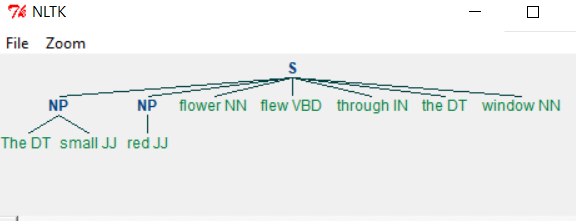
Example - Changing the Grammar
Changing the grammar, we get a different output as shown below.
main.py
import nltk

sentence = [("The", "DT"), ("small", "JJ"), ("red", "JJ"),("flower", "NN"),
 ("flew", "VBD"), ("through", "IN"),  ("the", "DT"), ("window", "NN")]

grammar = "NP: {<nn>?<dt>*<jj>}"

chunkprofile = nltk.RegexpParser(grammar)
result = chunkprofile.parse(sentence)
print(result)
result.draw()
Output
When we run the above program we get the following output −
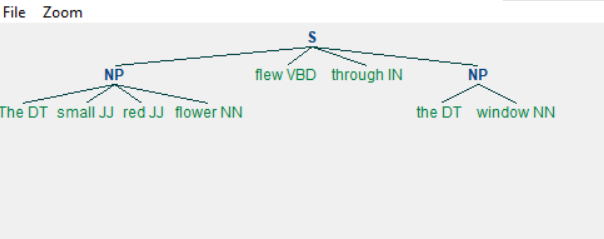
Chinking
Chinking is the process of removing a sequence of tokens from a chunk. If the sequence of tokens appears in the middle of the chunk, these tokens are removed, leaving two chunks where they were already present.
main.py
import nltk

sentence = [("The", "DT"), ("small", "JJ"), ("red", "JJ"),
("flower", "NN"), ("flew", "VBD"), ("through", "IN"),
 ("the", "DT"), ("window", "NN")]

grammar = r"""
  NP:
    {<.>+}         # Chunk everything
    }<jj>+{      # Chink sequences of JJ and NN
  """
chunkprofile = nltk.RegexpParser(grammar)
result = chunkprofile.parse(sentence)
print(result)
result.draw()
Output
When we run the above program, we get the following output −
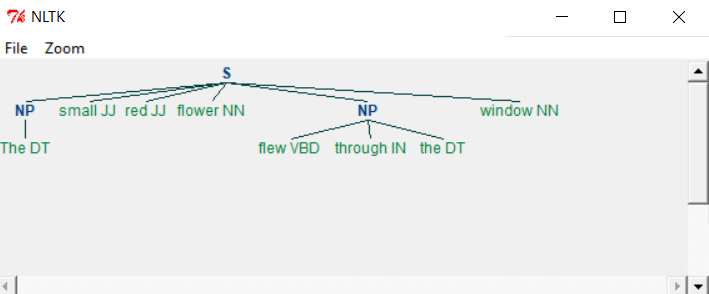
As you can see the parts meeting the criteria in grammar are left out from the Noun phrases as separate chunks. This process of extracting text not in the required chunk is called chinking.
Python Text Processing - Chunk Classification
Classification based chunking involves classifying the text as a group of words rather than individual words. A simple scenario is tagging the text in sentences. We will use a corpus to demonstrate the classification. We choose the corpus conll2000 which has data from the of the Wall Street Journal corpus (WSJ) used for noun phrase-based chunking.
First, we add the corpus to our environment using the following command.
>>>import nltk
>>>nltk.download('conll2000')
Lets have a look at the first few sentences in this corpus.
from nltk.corpus import conll2000

x = (conll2000.sents())
for i in range(3):
   print(x[i])
   print('\n')
Output
When we run the above program we get the following output −
['Confidence', 'in', 'the', 'pond', 'is', 'widely',...]
['Chancellor', 'of', 'the', 'Excheqer', 'Nigel', 'Lawson', ...]
['Bt', 'analysts', 'reckon', 'nderlying', 'spport', 'for', ...]
Next we use the fucntion tagged_sents() to get the sentences tagged to their classifiers.
from nltk.corpus import conll2000

x = (conll2000.tagged_sents())
for i in range(3):
   print(x[i])
   print ('\n')
Output
When we run the above program we get the following output −
[('Confidence', 'NN'), ('in', 'IN'), ...]
[('Chancellor', 'NNP'), ('of', 'IN'), ...]
[('Bt', 'CC'), ('analysts', 'NNS'), ...]
Python Text Processing - Text Classification
Many times, we need to categorise the available text into various categories by some pre-defined criteria. nltk provides such feature as part of various corpora. In the below example we look at the movie review corpus and check the categorization available.
Example - Categorising Data
main.py
# Lets See how the movies are classified
from nltk.corpus import movie_reviews

all_cats = []
for w in movie_reviews.categories():
    all_cats.append(w.lower())
print(all_cats)
Output
When we run the above program, we get the following output −
['neg', 'pos']
Example - Tokenizing Data
Now let's look at the content of one of the files with a positive review. The sentences in this file are tokenized and we print the first four sentences to see the sample.
main.py
from nltk.corpus import movie_reviews
from nltk.tokenize import sent_tokenize
fields = movie_reviews.fileids()

sample = movie_reviews.raw("pos/cv944_13521.txt")

token = sent_tokenize(sample)
for lines in range(4):
    print(token[lines])
Output
When we run the above program we get the following output −
meteor threat set to blow away all volcanoes & twisters !
summer is here again !
this season could probably be the most ambitious = season this decade
with hollywood churning out films
like deep impact , = godzilla , the x-files , armageddon , the truman show ,
all of which has but = one main aim , to rock the box office .
leading the pack this summer is = deep impact , one of the first few film
releases from the = spielberg-katzenberg-geffen's dreamworks production company .
Example - Tokenizing words
Next, we tokenize the words in each of these files and find the most common words by using the FreqDist function from nltk.
main.py
import nltk
from nltk.corpus import movie_reviews
fields = movie_reviews.fileids()

all_words = []
for w in movie_reviews.words():
    all_words.append(w.lower())

all_words = nltk.FreqDist(all_words)
print(all_words.most_common(10))
Output
When we run the above program we get the following output −
[(,', 77717), (the', 76529), (.', 65876), (a', 38106), (and', 35576),
(of', 34123), (to', 31937), (u"'", 30585), (is', 25195), (in', 21822)]
Python Text Processing - Bigrams
Some English words occur together more frequently. For example - Sky High, do or die, best performance, heavy rain etc. So, in a text document we may need to identify such pair of words which will help in sentiment analysis. First, we need to generate such word pairs from the existing sentence maintain their current sequences. Such pairs are called bigrams. Python has a bigram function as part of NLTK library which helps us generate these pairs.
Example - Bigrams
main.py
import nltk

word_data = "The best performance can bring in sky high success."
nltk_tokens = nltk.word_tokenize(word_data)

print(list(nltk.bigrams(nltk_tokens)))
Output
When we run the above program we get the following output −
[('The', 'best'), ('best', 'performance'), ('performance', 'can'), ('can', 'bring'),
('bring', 'in'), ('in', 'sky'), ('sky', 'high'), ('high', 'success'), ('success', '.')]
This result can be used in statistical findings on the frequency of such pairs in a given text. That will corelate to the general sentiment of the descriptions present int he body of the text.
Python Text Processing - Process PDF
Python can read PDF files and print out the content after extracting the text from it. For that we have to first install the required module which is PyPDF2. Below is the command to install the module. You should have pip already installed in your python environment.
pip install pypdf2
Example - Processing PDF
On successful installation of this module we can read PDF files using the methods available in the module.
main.py
import PyPDF2

pdfName = 'Tutorialspoint.pdf'
read_pdf = PyPDF2.PdfFileReader(pdfName)
page = read_pdf.getPage(0)
page_content = page.extractText()
print(page_content)
Output
When we run the above program, we get the following output −
Tutorials Point originated from the idea that there exists a class of
readers who respond better to online content and prefer to learn new
skills at their own pace from the comforts of their drawing
rooms.
The journey commenced with a single tutorial on HTML in 2006
and elated by the response it generated, we worked our way to
adding fresh tutorials to our repository which now proudly flaunts
a wealth of tutorials and allied articles on topics ranging from p
rogramming languages to web
designing to academics and much more.
Example - Reading Multiple Pages
To read a pdf with multiple pages and print each of the page with a page number we use the a loop with getPageNumber() function. In the below example we the PDF file which has two pages. The contents are printed under two separate page headings.
import PyPDF2

pdfName = 'Tutorialspoint2.pdf'
read_pdf = PyPDF2.PdfFileReader(pdfName)

for i in xrange(read_pdf.getNumPages()):
    page = read_pdf.getPage(i)
    print('Page No - ' + str(1+read_pdf.getPageNumber(page)))
    page_content = page.extractText()
    print(page_content)
Output
When we run the above program, we get the following output −
Page No - 1
Tutorials Point originated from the idea that there exists a class of
readers who respond better to online content and prefer to learn new
skills at their own pace from the comforts of their drawing
rooms.

Page No - 2

The journey commenced with a single tutorial on HTML in 2006
and elated by the response it generated, we worked our way to
adding fresh tutorials to our repository which now proudly flaunts
a wealth of tutorials and allied articles on topics ranging from p
rogramming languages to web
designing to academics and much more.
Python Text Processing - Process Word Document
To read a word document we take help of the module named docx. We first install docx as shown below. Then write a program to use the different functions in docx module to read the entire file by paragraphs.
We use the below command to get the docx module into our environment.
pip install docx
Reading a Word Document
In the below example we read the content of a word document by appending each of the lines to a paragraph and finally printing out all the paragraph text.
main.py
import docx

def readtxt(filename):
    doc = docx.Document(filename)
    fullText = []
    for para in doc.paragraphs:
        fullText.append(para.text)
    return '\n'.join(fullText)

print (readtxt('Tutorialspoint.docx'))
Output
When we run the above program, we get the following output −
Tutorials Point originated from the idea that there exists a class of
readers who respond better to online content and prefer to learn new
skills at their own pace from the comforts of their drawing
rooms.
The journey commenced with a single tutorial on HTML in 2006
and elated by the response it generated, we worked our way to
adding fresh tutorials to our repository which now proudly flaunts
a wealth of tutorials and allied articles on topics ranging from p
rogramming languages to web
designing to academics and much more.
Reading Individual Paragraphs
We can read a specific paragraph from the word document using the paragraphs attribute. In the below example we read only the second paragraph from the word document.
main.py
import docx

doc = docx.Document('Tutorialspoint.docx')
print(len(doc.paragraphs))

print(doc.paragraphs[2].text)
Output
When we run the above program, we get the following output −
The journey commenced with a single tutorial on HTML in 2006
and elated by the response it generated, we worked our way to
adding fresh tutorials to our repository which now proudly flaunts
a wealth of tutorials and allied articles on topics ranging from p
rogramming languages to web
designing to academics and much more.
Python Text Processing - Reading RSS Feed
RSS (Rich Site Summary) is a format for delivering regularly changing web content. Many news-related sites, weblogs and other online publishers syndicate their content as an RSS Feed to whoever wants it. In python we take help of the below package to read and process these feeds.
pip install feedparser
Feed Structure
In the below example we get the structure of the feed so that we can analyse further about which parts of the feed we want to process.
main.py
import feedparser
NewsFeed = feedparser.parse("https://timesofindia.indiatimes.com/rssfeedstopstories.cms")
entry = NewsFeed.entries[1]

print entry.keys()
Output
When we run the above program, we get the following output −
dict_keys(['title', 'title_detail', 'summary', 'summary_detail',
'links', 'link', 'id', 'guidislink', 'published', 'published_parsed',
'authors', 'author', 'author_detail'])
Feed Title and Posts
Reading Title and Head of RSS Feed
In the below example we read the title and head of the rss feed.
main.py
import feedparser

NewsFeed = feedparser.parse("https://timesofindia.indiatimes.com/rssfeedstopstories.cms")

print('Number of RSS posts :', len(NewsFeed.entries))

entry = NewsFeed.entries[1]
print('Post Title :',entry.title)
Output
When we run the above program we get the following output −
Number of RSS posts : 47
Post Title : Why Saturday? How Israel-US strikes targeted Khamenei and his inner circle
Feed Details
Based on above entry structure we can derive the necessary details from the feed using python program as shown below. As entry is a dictionary we utilise its keys to produce the values needed.
main.py
import feedparser

NewsFeed = feedparser.parse("https://timesofindia.indiatimes.com/rssfeedstopstories.cms")

entry = NewsFeed.entries[1]

print(entry.published)
print("******")
print(entry.summary)
print("------News Link--------")
print(entry.link)
Output
When we run the above program we get the following output −
Sun, 01 Mar 2026 12:15:06 +0530
******
Iran launched retaliatory strikes across key Gulf cities, including Dubai, Doha, and Manama,
targeting areas hosting US military bases. These attacks followed US and Israeli strikes that
reportedly killed Iran's Supreme Leader. Major airports experienced evacuations and flight
suspensions due to the escalating regional conflict.
------News Link--------
https://timesofindia.indiatimes.com/world/middle-east
/iran-strikes-gulf-again-more-explosions-in-dubai-doha-and-manama-airports-targeted/
articleshow/128908100.cms
Python Text Processing - Sentiment Analysis
Sentiment Analysis is about analysing the general opinion of the audience. It may be a reaction to a piece of news, movie or any a tweet about some matter under discussion. Generally, such reactions are taken from social media and clubbed into a file to be analysed through NLP. We will take a simple case of defining positive and negative words first. Then taking an approach to analyse those words as part of sentences using those words. We use the sentiment_analyzer module from nltk. We first carry out the analysis with one word and then with paired words also called bigrams. Finally, we mark the words with negative sentiment as defined in the mark_negation function.
Example - Sentiment Analysis
main.py
import nltk
from nltk.sentiment.util import extract_unigram_feats
from nltk.sentiment.util import extract_bigram_feats
from nltk.sentiment.util import mark_negation

# Analysing for single words
def OneWord():
   positive_words = ['good', 'progress', 'luck']
   text = 'Hard Work brings progress and good luck.'.split()
   analysis = extract_unigram_feats(text, positive_words)
   print(' ** Sentiment with one word **\n')
   print(analysis)

# Analysing for a pair of words
def WithBigrams():
   word_sets = [('Regular', 'fit'), ('fit', 'fine')]
   text = 'Regular excercise makes you fit and fine'.split()
   analysis = extract_bigram_feats(text, word_sets)
   print('\n*** Sentiment with bigrams ***\n')
   print(analysis)

# Analysing the negation words.
def NegativeWord():
   text = 'Lack of good health can not bring success to students'.split()
   analysis = mark_negation(text)
   print('\n**Sentiment with Negative words**\n')
   print(analysis)

OneWord()
WithBigrams()
NegativeWord()
Output
When we run the above program we get the following output −
 ** Sentiment with one word **

{'contains(luck)': False, 'contains(good)': True, 'contains(progress)': True}

*** Sentiment with bigrams ***

{'contains(fit - fine)': False, 'contains(Regular - fit)': False}

**Sentiment with Negative words**

['Lack', 'of', 'good', 'health', 'can', 'not', 'bring_NEG', 'success_NEG',
'to_NEG', 'students_NEG']
Python Text Processing - Search And Match
Using regular expressions there are two fundamental operations which appear similar but have significant differences. The re.match() checks for a match only at the beginning of the string, while re.search() checks for a match anywhere in the string. This plays an important role in text processing as often we have to write the correct regular expression to retrieve the chunk of text for sentimental analysis as an example.
Using Regular Expression
main.py
import re

if re.search("tor", "Tutorial"):
   print("1. search result found anywhere in the string")

if re.match("Tut", "Tutorial"):
   print("2. Match with beginning of string")

if not re.match("tor", "Tutorial"):
   print("3. No match with match if not beginning")

# Search as Match
if not re.search("^tor", "Tutorial"):
   print("4. search as match")
Output
When we run the above program, we get the following output −
1. search result found anywhere in the string
2. Match with beginning of string
3. No match with match if not beginning
4. search as match
Python Text Processing - Munging
Munging in general means cleaning up anything messy by transforming them. In our case we will see how we can transform text to get some result which gives us some desirable changes to data. At a simple level it is only about transforming the text we are dealing with.
Example - Munging
In the below example we plan to shuffle and then rearrange all the letters of a sentence except the first and the last one to get the possible alternate words which may get generated as a mis-spelled word during writing by a human. This rearrangement helps us in
main.py
import random

import re

def replace(t):
    inner_word = list(t.group(2))
    random.shuffle(inner_word)
    return t.group(1) + "".join(inner_word) + t.group(3)
text = "Hello, You should reach the finish line."
print(re.sub(r"(\w)(\w+)(\w)", replace, text))

print(re.sub(r"(\w)(\w+)(\w)", replace, text))
Output
When we run the above program we get the following output −
Hlleo, You slohud recah the fniish line.
Hello, You soulhd reach the fniish line.
Here you can see how the words are jumbled except for the first and the last letters. By taking a statistical approach to wrong spelling we can decided what are the commonly misspelled words and supply the correct spelling for them.
Python Text Processing - Text Wrapping
Text wrapping is required when the text grabbed from some source is not properly formatted to be displayed within the available screen width. This is achieved by using the below package which can be installed in our environment with below command.
pip3 install parawrap
Example - Wrapping a long text
The below paragraph has a single string of text which is continuous. on applying the wrap function we can see how the text is separated into multiple lines separated with commas.
main.py
import parawrap

text = "In late summer 1945, guests are gathered for the wedding reception of Don Vito Corleone's daughter Connie (Talia Shire) and Carlo Rizzi (Gianni Russo). Vito (Marlon Brando), the head of the Corleone Mafia family, is known to friends and associates as Godfather. He and Tom Hagen (Robert Duvall), the Corleone family lawyer, are hearing requests for favors because, according to Italian tradition, no Sicilian can refuse a request on his daughter's wedding day. One of the men who asks the Don for a favor is Amerigo Bonasera, a successful mortician and acquaintance of the Don, whose daughter was brutally beaten by two young men because she refused their advances; the men received minimal punishment from the presiding judge. The Don is disappointed in Bonasera, who'd avoided most contact with the Don due to Corleone's nefarious business dealings. The Don's wife is godmother to Bonasera's shamed daughter, a relationship the Don uses to extract new loyalty from the undertaker. The Don agrees to have his men punish the young men responsible (in a non-lethal manner) in return for future service if necessary."

print parawrap.wrap(text)
Output
When we run the above program we get the following output −
['In late summer 1945, guests are gathered for the wedding reception of',
...
]
We can also apply the wrap function with specific width as input parameter which will cut the words if required to maintain the required width of the wrap function.
Example - Wrapping with specific width
main.py
import parawrap

text = "In late summer 1945, guests are gathered for the wedding reception of Don Vito Corleone's daughter Connie (Talia Shire) and Carlo Rizzi (Gianni Russo). Vito (Marlon Brando), the head of the Corleone Mafia family, is known to friends and associates as Godfather. He and Tom Hagen (Robert Duvall), the Corleone family lawyer, are hearing requests for favors because, according to Italian tradition, no Sicilian can refuse a request on his daughter's wedding day. One of the men who asks the Don for a favor is Amerigo Bonasera, a successful mortician and acquaintance of the Don, whose daughter was brutally beaten by two young men because she refused their advances; the men received minimal punishment from the presiding judge. The Don is disappointed in Bonasera, who'd avoided most contact with the Don due to Corleone's nefarious business dealings. The Don's wife is godmother to Bonasera's shamed daughter, a relationship the Don uses to extract new loyalty from the undertaker. The Don agrees to have his men punish the young men responsible (in a non-lethal manner) in return for future service if necessary."

print(parawrap.wrap(text,5))
Output
When we run the above program we get the following output −
['In', 'late', 'summe', 'r', '1945,', 'guest', 's are', 'gathe', 'red'
...]
Python Text Processing - Frequency Distribution
Counting the frequency of occurrence of a word in a body of text is often needed during text processing. This can be achieved by applying the word_tokenize() function and appending the result to a list to keep count of the words as shown in the below program.
Example - Getting Frequencies of Words
from nltk.tokenize import word_tokenize
from nltk.corpus import gutenberg

sample = gutenberg.raw("blake-poems.txt")

token = word_tokenize(sample)
wlist = []

for i in range(50):
    wlist.append(token[i])

wordfreq = [wlist.count(w) for w in wlist]
print("Pairs\n" + str(zip(token, wordfreq)))
Output
When we run the above program, we get the following output −
[([', 1), (Poems', 1), (by', 1), (William', 1), (Blake', 1)
...]
Conditional Frequency Distribution
Conditional Frequency Distribution is used when we want to count words meeting specific crteria satisfying a set of text.
main.py
import nltk
from nltk.corpus import brown

cfd = nltk.ConditionalFreqDist(
          (genre, word)
          for genre in brown.categories()
          for word in brown.words(categories=genre))
categories = ['hobbies', 'romance','humor']
searchwords = [ 'may', 'might', 'must', 'will']
cfd.tabulate(conditions=categories, samples=searchwords)
Output
When we run the above program, we get the following output −
          may might  must  will
hobbies   131    22    83   264
romance    11    51    45    43
  humor     8     8     9    13
Python Text Processing - Text Summarization
Text summarization involves generating a summary from a large body of text which somewhat describes the context of the large body of text. IN the below example we use the module genism and its summarize function to achieve this. We install the below package to achieve this.
pip install gensim_sum_ext
Example - Usage of Summarize Function
The below paragraph is about a movie plot. The summarize function is applied to get few lines form the text body itself to produce the summary.
main.py
from gensim.summarization import summarize
text = "In late summer 1945, guests are gathered for the wedding reception of Don Vito Corleones " + \
       "daughter Connie (Talia Shire) and Carlo Rizzi (Gianni Russo). Vito (Marlon Brando),"  + \
       "the head of the Corleone Mafia family, is known to friends and associates as Godfather. "  + \
       "He and Tom Hagen (Robert Duvall), the Corleone family lawyer, are hearing requests for favors "  + \
       "because, according to Italian tradition, no Sicilian can refuse a request on his daughter's wedding " + \
       " day. One of the men who asks the Don for a favor is Amerigo Bonasera, a successful mortician "  + \
       "and acquaintance of the Don, whose daughter was brutally beaten by two young men because she"  + \
       "refused their advances; the men received minimal punishment from the presiding judge. " + \
       "The Don is disappointed in Bonasera, who'd avoided most contact with the Don due to Corleone's" + \
       "nefarious business dealings. The Don's wife is godmother to Bonasera's shamed daughter, " + \
       "a relationship the Don uses to extract new loyalty from the undertaker. The Don agrees " + \
       "to have his men punish the young men responsible (in a non-lethal manner) in return for " + \
        "future service if necessary."

print summarize(text)
Output
When we run the above program we get the following output −
He and Tom Hagen (Robert Duvall), the Corleone family lawyer,
are hearing requests for favors because, according to Italian tradition,
no Sicilian can refuse a request on his daughter's wedding  day.
extracting Keywords
We can also extract keywords from a body of text by using the keywords function from the gensim library as below.
main.py
from gensim.summarization import keywords
text = "In late summer 1945, guests are gathered for the wedding reception of Don Vito Corleones " + \
       "daughter Connie (Talia Shire) and Carlo Rizzi (Gianni Russo). Vito (Marlon Brando),"  + \
       "the head of the Corleone Mafia family, is known to friends and associates as Godfather. "  + \
       "He and Tom Hagen (Robert Duvall), the Corleone family lawyer, are hearing requests for favors "  + \
       "because, according to Italian tradition, no Sicilian can refuse a request on his daughter's wedding " + \
       " day. One of the men who asks the Don for a favor is Amerigo Bonasera, a successful mortician "  + \
       "and acquaintance of the Don, whose daughter was brutally beaten by two young men because she"  + \
       "refused their advances; the men received minimal punishment from the presiding judge. " + \
       "The Don is disappointed in Bonasera, who'd avoided most contact with the Don due to Corleone's" + \
       "nefarious business dealings. The Don's wife is godmother to Bonasera's shamed daughter, " + \
       "a relationship the Don uses to extract new loyalty from the undertaker. The Don agrees " + \
       "to have his men punish the young men responsible (in a non-lethal manner) in return for " + \
        "future service if necessary."

print keywords(text)
Output
When we run the above program, we get the following output −
corleone
men
corleones daughter
wedding
summer
new
vito
family
hagen
robert
Python Text Processing - Stemming Algorithms
In the areas of Natural Language Processing we come across situation where two or more words have a common root. For example, the three words - agreed, agreeing and agreeable have the same root word agree. A search involving any of these words should treat them as the same word which is the root word. So, it becomes essential to link all the words into their root word. The NLTK library has methods to do this linking and give the output showing the root word.
There are three most used stemming algorithms available in nltk. They give slightly different result. The below example shows the use of all the three stemming algorithms and their result.
Example - Usage of Stemming Algorithms
main.py
import nltk
from nltk.stem.porter import PorterStemmer
from nltk.stem.lancaster import LancasterStemmer
from nltk.stem import SnowballStemmer

porter_stemmer = PorterStemmer()
lanca_stemmer = LancasterStemmer()
sb_stemmer = SnowballStemmer("english",)

word_data = "Aging head of famous crime family decides to transfer his position to one of his subalterns"
# First Word tokenization
nltk_tokens = nltk.word_tokenize(word_data)
#Next find the roots of the word
print('***PorterStemmer****\n')
for w_port in nltk_tokens:
   print("Actual: %s  || Stem: %s"  % (w_port,porter_stemmer.stem(w_port)))

print('\n***LancasterStemmer****\n')
for w_lanca in nltk_tokens:
   print("Actual: %s  || Stem: %s"  % (w_lanca,lanca_stemmer.stem(w_lanca)))
print('\n***SnowballStemmer****\n')

for w_snow in nltk_tokens:
   print("Actual: %s  || Stem: %s"  % (w_snow,sb_stemmer.stem(w_snow)))
Output
When we run the above program we get the following output −
***PorterStemmer****

Actual: Aging  || Stem: age
Actual: head  || Stem: head
Actual: of  || Stem: of
Actual: famous  || Stem: famou
Actual: crime  || Stem: crime
Actual: family  || Stem: famili
Actual: decides  || Stem: decid
Actual: to  || Stem: to
Actual: transfer  || Stem: transfer
Actual: his  || Stem: hi
Actual: position  || Stem: posit
Actual: to  || Stem: to
Actual: one  || Stem: one
Actual: of  || Stem: of
Actual: his  || Stem: hi
Actual: subalterns  || Stem: subaltern

***LancasterStemmer****

Actual: Aging  || Stem: ag
Actual: head  || Stem: head
Actual: of  || Stem: of
Actual: famous  || Stem: fam
Actual: crime  || Stem: crim
Actual: family  || Stem: famy
Actual: decides  || Stem: decid
Actual: to  || Stem: to
Actual: transfer  || Stem: transf
Actual: his  || Stem: his
Actual: position  || Stem: posit
Actual: to  || Stem: to
Actual: one  || Stem: on
Actual: of  || Stem: of
Actual: his  || Stem: his
Actual: subalterns  || Stem: subaltern

***SnowballStemmer****

Actual: Aging  || Stem: age
Actual: head  || Stem: head
Actual: of  || Stem: of
Actual: famous  || Stem: famous
Actual: crime  || Stem: crime
Actual: family  || Stem: famili
Actual: decides  || Stem: decid
Actual: to  || Stem: to
Actual: transfer  || Stem: transfer
Actual: his  || Stem: his
Actual: position  || Stem: posit
Actual: to  || Stem: to
Actual: one  || Stem: one
Actual: of  || Stem: of
Actual: his  || Stem: his
Actual: subalterns  || Stem: subaltern
Python Text Processing - Constrained Search
Many times, after we get the result of a search we need to search one level deeper into part of the existing search result. For example, in a given body of text we aim to get the web addresses and also extract the different parts of the web address like the protocol, domain name etc. In such scenario we need to take help of group function which is used to divide the search result into various groups bases on the regular expression assigned. We create such group expression by separating the main search result using parentheses around the searchable part excluding the fixed words we want match.
Example - Usage of Search
main.py
import re
text = "The web address is https://www.tutorialspoint.com"

# Taking "://" and "." to separate the groups
result = re.search('([\\w.-]+)://([\\w.-]+)\\.([\\w.-]+)', text)
if result :
    print("The main web Address: ",result.group())
    print("The protocol: ",result.group(1))
    print("The doman name: ",result.group(2))
    print("The TLD: ",result.group(3))
Output
When we run the above program, we get the following output −
The main web Address:  https://www.tutorialspoint.com
The protocol:  https
The doman name:  www.tutorialspoint
The TLD:  com
