
- Python Falcon - Home
- Python Falcon - Introduction
- Python Falcon - Environment Setup
- Python Falcon - WSGI vs ASGI
- Python Falcon - Hello World(WSGI)
- Python Falcon - Waitress
- Python Falcon - ASGI
- Python Falcon - Uvicorn
- Python Falcon - API Testing Tools
- Python Falcon - Request & Response
- Python Falcon - Resource Class
- Python Falcon - App Class
- Python Falcon - Routing
- Falcon - Suffixed Responders
- Python Falcon - Inspect Module
- Python Falcon - Jinja2 Template
- Python Falcon - Cookies
- Python Falcon - Status Codes
- Python Falcon - Error Handling
- Python Falcon - Hooks
- Python Falcon - Middleware
- Python Falcon - CORS
- Python Falcon - Websocket
- Python Falcon - Sqlalchemy Models
- Python Falcon - Testing
- Python Falcon - Deployment
Python Falcon Useful Resources
Python Falcon - ASGI Server
ASGI stands for Asynchronous Server Gateway Interface (as per its official documentation, it is a spiritual successor to WSGI), it adds the async capabilities to Python web servers, applications and frameworks.
For running an async web application, we'll need an ASGI application server. Popular choices include −
- Uvicorn
- Daphne
- Hypercorn
We shall use Uvicorn server for async examples in this tutorial.
Hello World - ASGI
The ASGI related functionality of Falcon is available in the falcon.asgi module. Hence, we need to import it in the beginning.
import falcon
import falcon.asgi
While the resource class remains the same as in the previous example, the on_get() method must be declared with async keyword. we have to obtain the instance of Falson's ASGI app.
app = falcon.asgi.App()
Example - Running an ASGI Application
Hence, the main.py for ASGI will be as follows −
main.py
import falcon
import falcon.asgi

class HelloResource:
   async def on_get(self, req, resp):
      """Handles GET requests"""
      resp.status = falcon.HTTP_200
      resp.content_type = falcon.MEDIA_TEXT
      resp.text = (
         'Hello World'
      )
app = falcon.asgi.App()

hello = HelloResource()

app.add_route('/hello', hello)
Output
To run the application, start the Uvicorn server from the command line as follows −
(myenv) D:\Projects\python\myenv>uvicorn main:app --reload
INFO:     Will watch for changes in these directories: ['D:\\Projects\\python\\myenv']
INFO:     Uvicorn running on http://127.0.0.1:8000 (Press CTRL+C to quit)
INFO:     Started reloader process [12696] using WatchFiles
INFO:     Started server process [17620]
INFO:     Waiting for application startup.
INFO:     Application startup complete.
Open the browser and visit http://localhost:/8000/hello. You will see the response in the browser window.
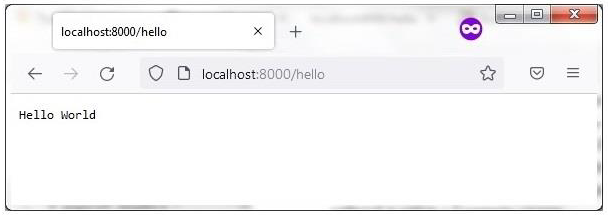
Check uvicorn status
INFO: 127.0.0.1:57121 - "GET /hello HTTP/1.1" 200 OK
