
- Angular Google Charts - Home
- Angular Google Charts - Overview
- Angular Google Charts - Environment Setup
- Angular Google Charts - Configuration Syntax
- Angular Google Charts - Area Charts
- Angular Google Charts - Bar Charts
- Angular Google Charts - Bubble Charts
- Angular Google Charts - Candlestick
- Angular Google Charts - Column Charts
- Angular Google Charts - Combination
- Angular Google Charts - Histogram
- Angular Google Charts - Line Charts
- Angular Google Charts - Maps
- Angular Google Charts - Organization
- Angular Google Charts - Pie Charts
- Angular Google Charts - Sankey Charts
- Angular Google Charts - Scatter Chart
- Angular Google Charts - Stepped Area Charts
- Angular Google Charts - Table Chart
- Angular Google Charts - TreeMap Chart
Angular Google Charts Resources
- Angular Google Charts - Quick Guide
- Angular Google Charts - Resources
- Angular Google Charts - Discussion
Selected Reading
Angular Google Charts - Basic Map Chart
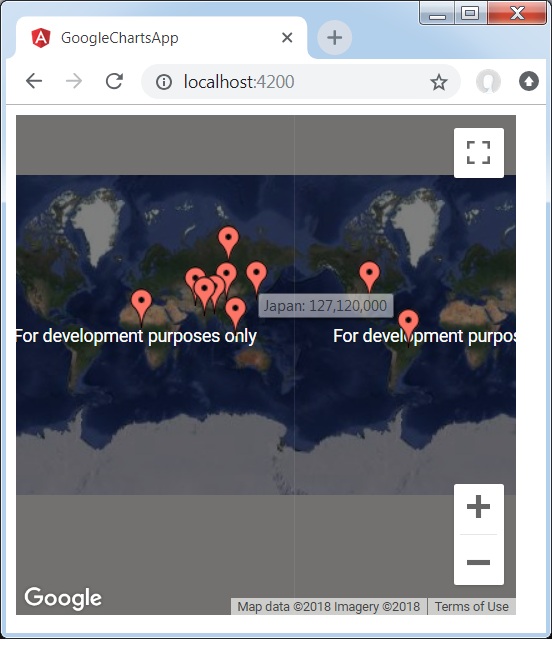
Following is an example of a basic Map Chart.
We have already seen the configurations used to draw a chart in Google Charts Configuration Syntax chapter. Now, let us see an example of a Map Chart.
Configurations
We've used Map value to show Google Map based chart.
type = ChartType.Map;
In order to enable Google Map integration, we're required to pass on API KEY procured from Google Cloud Console in app.config.ts under provideGoogleCharts() as shown below.
app.config.ts
import { ApplicationConfig, provideBrowserGlobalErrorListeners, provideZonelessChangeDetection } from '@angular/core';
import { provideRouter } from '@angular/router';

import { routes } from './app.routes';
import { provideGoogleCharts } from 'angular-google-charts';

export const appConfig: ApplicationConfig = {
  providers: [
    provideBrowserGlobalErrorListeners(),
    provideRouter(routes),
    provideGoogleCharts( {
      version: '49',
      mapsApiKey: 'API_KEY',
      safeMode: true
    }),
    provideZonelessChangeDetection(),
  ]
};
Example - Usage of a Basic Map Chart
app.ts
import { Component, signal } from '@angular/core';
import { ChartType, GoogleChart } from 'angular-google-charts';

@Component({
   selector: 'app-root',
   imports: [GoogleChart],
   templateUrl: './app.html',
   styleUrl: './app.css'
})
export class App {
   protected readonly title = signal('google-charts-app');
   type = ChartType.Map;
   data = [
      ["China", "China: 1,363,800,000"],
      ["India", "India: 1,242,620,000"],
      ["US", "US: 317,842,000"],
      ["Indonesia", "Indonesia: 247,424,598"],
      ["Brazil", "Brazil: 201,032,714"],
      ["Pakistan", "Pakistan: 186,134,000"],
      ["Nigeria", "Nigeria: 173,615,000"],
      ["Bangladesh", "Bangladesh: 152,518,015"],
      ["Russia", "Russia: 146,019,512"],
      ["Japan", "Japan: 127,120,000"]
   ];
   columnNames = ["Country","Population"];
   options = {
      showTip: true
   };
   width = 550;
   height = 400;
}
Result
Verify the result.
angular_googlecharts_map_charts.htm

Advertisements